Modern Microsoft 365 environments demand precision, least privilege, and auditability. Yet many organizations still rely on broad Graph application permissions like Mail.Read or Sites.Read.All, unintentionally granting apps access to every mailbox or SharePoint site. Some apps legitimately require tenant‑wide access (e.g., threat detection tools), while others must be restricted to specific mailboxes or specific SharePoint sites.
This post walks through a fully automated, end‑to‑end PowerShell implementation of granular RBAC for:
- Exchange Online using attribute‑based management scopes
- SharePoint Online using Sites.Selected
- Entra ID for app registration, service principal creation, and permission assignments
All access is restricted to a Mail‑Enabled Security Group (MESG) whose membership is synchronized into a mailbox attribute. This creates a clean, scalable, and least‑privilege RBAC model.
Source codes and test scripts related to this post are shared at GitHub for your convenience.
🚫 Critical Warning: Do NOT Assign Mail.Read or Sites.Read.All (Application Permissions)
This is the most important security takeaway.
Why you must NOT assign Mail.Read (Application)
If you assign Mail.Read (Application) in the Entra ID app registration:
- The app receives tenant‑wide mailbox access from Entra ID
- Exchange Online RBAC cannot restrict or scope it
- Your attribute‑based scope becomes irrelevant or ignored
This is explicitly demonstrated in my earlier testing: assigning Mail.Read at the app registration bypasses EXO RBAC entirely.
Why you must NOT assign Sites.Read.All (Application)
Similarly:
- Sites.Read.All (Application) grants tenant‑wide SharePoint access
- SharePoint will ignore Sites.Selected scoping
- The app can read every site and every file
This is a major security risk and defeats the purpose of granular access.
Correct approach
- Do NOT assign Mail.Read (Application)
- Do NOT assign Sites.Read.All (Application)
- Use Exchange Online RBAC for mailbox scoping
- Use Sites.Selected (Application) for SharePoint scoping and assign RBAC at the SharePoint site(s).
This is exactly how the demo script is structured.
⭐ What You Will Achieve
By the end of this guide, you will have:
- A dedicated Entra ID application + service principal
- Delegated and application Graph permissions
- A Mail‑Enabled Security Group (MESG)
- Automatic MESG → mailbox attribute synchronization
- An Exchange Online attribute‑based management scope
- A scoped Application Mail.Read role assignment
- A SharePoint Sites.Selected permission granting site‑level access
All tied together with a single PowerShell script.
1. Configuration Variables
These values define your environment. Update them as needed. Credentials or secrets are removed from this post to maintain integrity of the demo tenant. This tenant does NOT contain any personal or sensitive data. I could have removed some of the config settings like tenant id, user id, etc. but I kept them for educational purpose.
$TenantId          = "c33386cf-6e11-484c-a983-b49975ce571a"
$AppDisplayName    = "M365-RBAC-DEMO"
$MailboxAttribute  = "CustomAttribute1"
$MailboxAttrValue  = $AppDisplayName
$MgmtScopeName     = "$AppDisplayName-Attribute-Scope"
$RoleAssignmentName= "$AppDisplayName-Role-Assignment"
$MESG              = "$AppDisplayName-MESG"
$MESGAlias         = "M365RBACDemoMESG"
$member1           = "Paul.Smith@aspnet4you2.onmicrosoft.com"
$member2           = "Bob.Smith@aspnet4you2.onmicrosoft.com"
$spsite            = "https://graph.microsoft.com/v1.0/sites/aspnet4you2.sharepoint.com:/sites/Graph-Demo"
2. Connect to Microsoft Graph
Connect-MgGraph -TenantId $TenantId -Scopes @(
    "Application.ReadWrite.All",
    "Directory.ReadWrite.All",
    "AppRoleAssignment.ReadWrite.All",
    "Sites.FullControl.All"
)
3. Create the Entra ID App + Service Principal
$app = New-MgApplication -DisplayName $AppDisplayName -SignInAudience "AzureADMyOrg"
$sp  = New-MgServicePrincipal -AppId $app.AppId
If you prefer to use an existing app, uncomment the alternative section in the script.
4. Assign Graph Application Permissions
We intentionally avoid Mail.Read and Sites.Read.All because they grant tenant‑wide access.
Instead, we assign only:
- Sites.Selected (app permission)
$graphSp = Get-MgServicePrincipal -Filter "appId eq '00000003-0000-0000-c000-000000000000'"

$sitesSelected = $graphSp.AppRoles | Where-Object {
    $_.Value -eq "Sites.Selected" -and $_.AllowedMemberTypes -contains "Application"
}

New-MgServicePrincipalAppRoleAssignment -ServicePrincipalId $sp.Id `
    -PrincipalId $sp.Id `
    -ResourceId $graphSp.Id `
    -AppRoleId $sitesSelected.Id
5. Assign Delegated Permissions
These are for interactive user flows (not app‑only).
$mailReadDelegated = $graphSp.Oauth2PermissionScopes | Where-Object {
    $_.Value -eq "Mail.Read" -and $_.Type -eq "User"
}

$sitesReadWriteAllDelegated = $graphSp.Oauth2PermissionScopes | Where-Object {
    $_.Value -eq "Sites.ReadWrite.All" -and $_.Type -eq "User"
}

Update-MgApplication -ApplicationId $app.Id -RequiredResourceAccess @(
    @{
        ResourceAppId = "00000003-0000-0000-c000-000000000000"
        ResourceAccess = @(
            @{ Id = $mailReadDelegated.Id; Type = "Scope" }
            @{ Id = $sitesReadWriteAllDelegated.Id; Type = "Scope" }
        )
    }
)
Admin consent is granted programmatically:
New-MgOauth2PermissionGrant -BodyParameter @{
    clientId     = $sp.Id
    consentType  = "AllPrincipals"
    principalId  = $null
    resourceId   = $graphSp.Id
    scope        = "Mail.Read Sites.ReadWrite.All"
}
6. Connect to Exchange Online
Connect-ExchangeOnline -DisableWAM
7. Create the Mail‑Enabled Security Group (MESG)
New-DistributionGroup `
    -Name $MESG `
    -DisplayName $MESG `
    -Alias $MESGAlias `
    -Type Security

$newmembers = @($member1, $member2)

foreach ($m in $newmembers) {
    Add-DistributionGroupMember -Identity $MESG -Member $m
}
8. Sync MESG Membership → Mailbox Attribute
This is the key to attribute‑based scoping.
$members = Get-DistributionGroupMember $MESG

foreach ($m in $members) {
    if ($m.RecipientType -eq "UserMailbox") {
        $setParams = @{ Identity = $m.PrimarySmtpAddress }
        $setParams[$MailboxAttribute] = $MailboxAttrValue
        Set-Mailbox @setParams
    }
}
9. Create the Attribute‑Based Management Scope
$scopeFilter = "$MailboxAttribute -eq '$MailboxAttrValue'"

$existingScope = Get-ManagementScope -ErrorAction SilentlyContinue |
    Where-Object {$_.Name -eq $MgmtScopeName}

if (-not $existingScope) {
    $mgmtScope = New-ManagementScope -Name $MgmtScopeName -RecipientRestrictionFilter $scopeFilter
} else {
    $mgmtScope = $existingScope
}
10. Create the Exchange Online Service Principal Pointer
$exoSp = New-ServicePrincipal -AppId $app.AppId -ObjectId $sp.Id -DisplayName $AppDisplayName -ErrorAction SilentlyContinue

if (-not $exoSp) {
    $exoSp = Get-ServicePrincipal | Where-Object { $_.AppId -eq $app.AppId }
}
11. Assign the Application Mail.Read Role (Scoped)
$roleName = "Application Mail.Read"

$existingAssignment = Get-ManagementRoleAssignment -ErrorAction SilentlyContinue |
    Where-Object {$_.Name -eq $RoleAssignmentName}

if (-not $existingAssignment) {
    New-ManagementRoleAssignment `
        -Name $RoleAssignmentName `
        -Role $roleName `
        -App $exoSp.Id `
        -CustomResourceScope $mgmtScope.Identity
}
This ensures the app can read only mailboxes whose attribute matches the MESG membership.
12. Grant SharePoint Site Access (Sites.Selected)
$site = Invoke-MgGraphRequest -Method GET -Uri $spsite
$siteId = $site.id

$body = @{
    roles = @("fullcontrol")
    grantedToIdentities = @(
        @{
            application = @{
                id = $app.AppId
                displayName = $AppDisplayName
            }
        }
    )
}

Invoke-MgGraphRequest -Method POST `
    -Uri "https://graph.microsoft.com/v1.0/sites/$siteId/permissions" `
    -Body ($body | ConvertTo-Json -Depth 5)
Final Output
Your service principal is now:
- Scoped to specific mailboxes via attribute‑based RBAC
- Scoped to a specific SharePoint site via Sites.Selected
- Configured for least‑privilege access across Microsoft 365
This is a clean, scalable, and secure RBAC model suitable for production environments.
Testing with Postman
It would be incomplete unless you can test your configurations and setup! To facilitate the testing, I used Postman to –
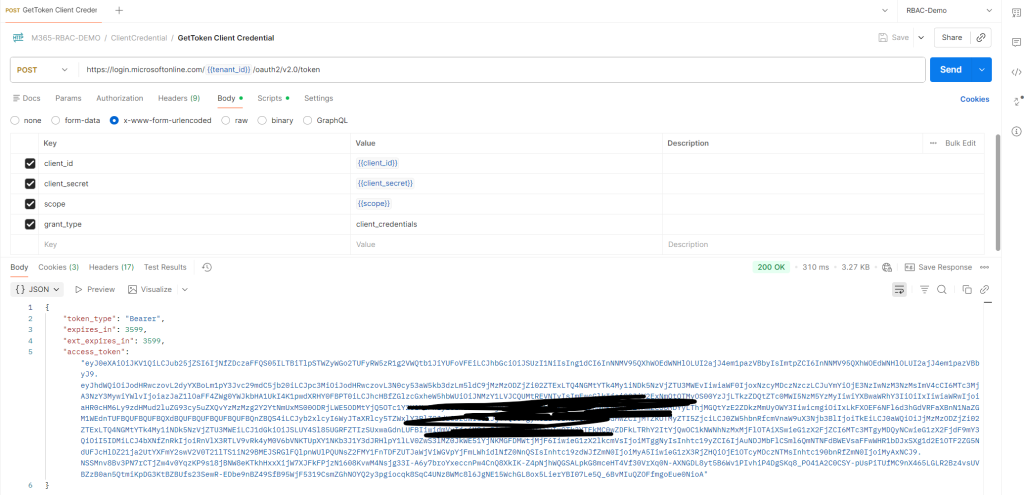
- Acquire Access Token from Entra ID using Client Credential flow. Save the access token in environment variable so we can use it to make graph calls.
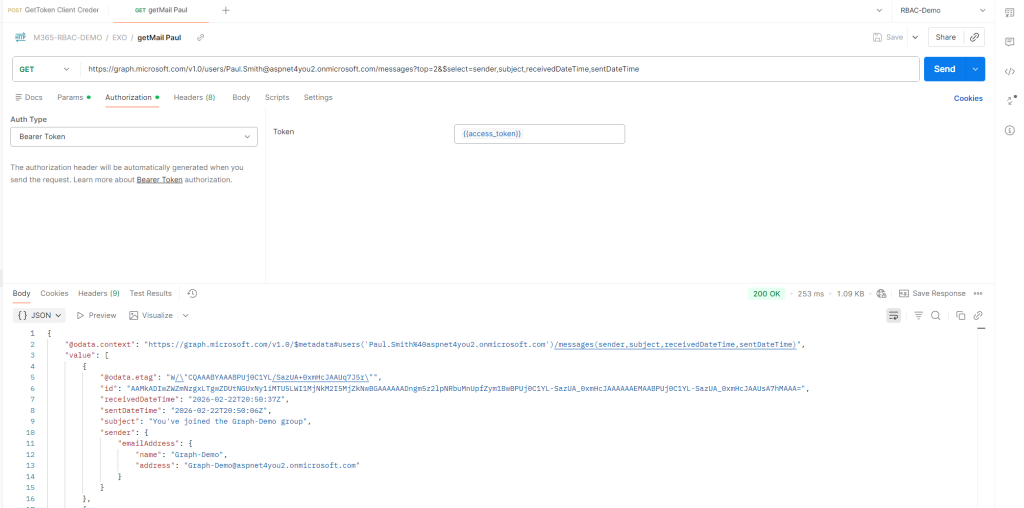
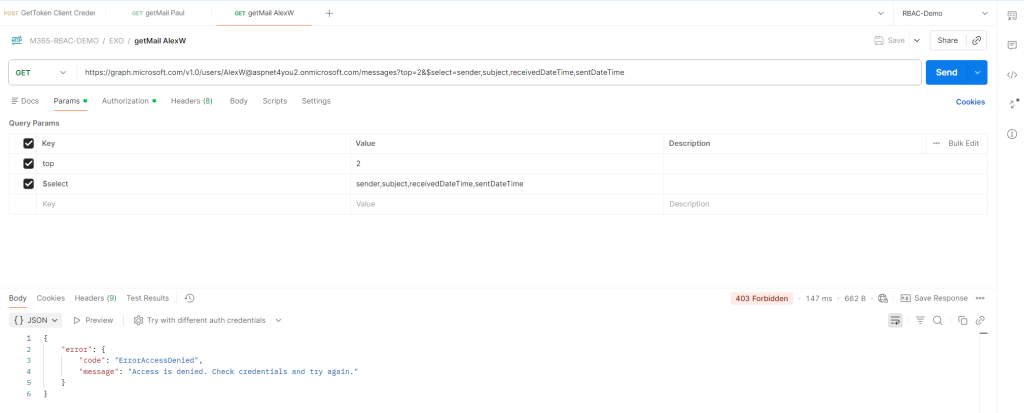
- As per setup, the app can access mailbox of Paul and Bob, but it can’t access Alex or other user’s mailboxes.
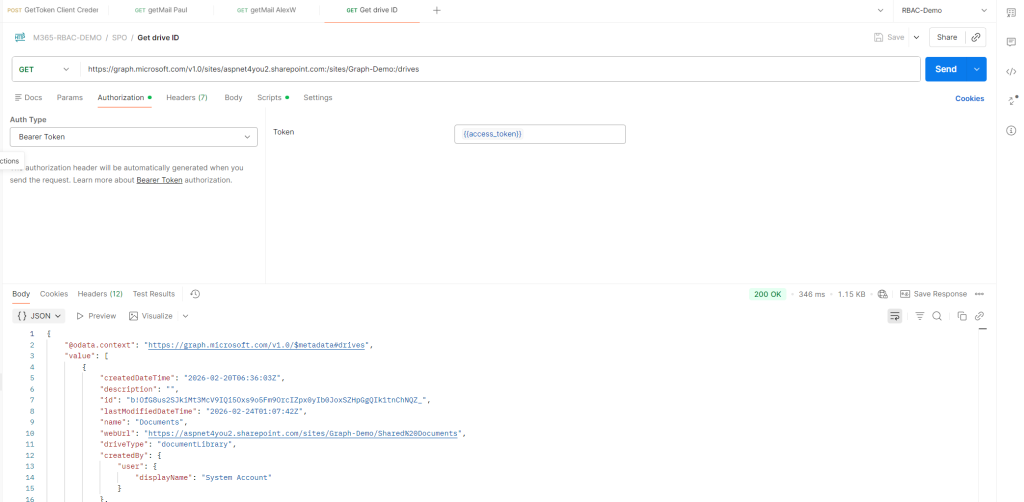
- App can access Graph-Demo site, but it can’t access any other sites.
- Source codes can be found at GitHub.
🧪 Test Case 1 — Get Access Token (Client Credential Flow)
Environment variables include:
"tenant_id": "c33386cf-6e11-484c-a983-b49975ce571a""client_id": "e22adff0-3b54-4621-af94-d052582380b3"
Use the request:
Collection → ClientCredential → GetToken Client Credential
This sends:
grant_type=client_credentials client_id={{client_id}} client_secret={{client_secret}} scope={{scope}}
The test script stores the token:
pm.environment.set(“access_token”, JSON.parse(responseBody).access_token);
🧪 Test Case 2 — Read Mail from Allowed Mailboxes (Paul & Bob)
Use:
- EXO → getMail Paul
- EXO → getMail Bob
Both requests use:
Authorization: Bearer {{access_token}}
Expected result:
- Paul → ✔️ Success
- Bob → ✔️ Success
This confirms the attribute‑based scope is working.
🧪 Test Case 3 — Attempt to Read Mail from Unauthorized Mailboxes
Use:
- EXO → getMail Adele
- EXO → getMail AlexW
Expected result:
- Adele → ❌ Access Denied
- AlexW → ❌ Access Denied
This validates that the app cannot read tenant‑wide mailboxes.
🧪 Test Case 4 — SharePoint Access Using Sites.Selected
1. Get Site ID
Use:
SPO → Get SiteId
The test script extracts:
var site_id = responseBody.id; pm.environment.set(“site_id”, site_id);
2. Get Drive ID
SPO → Get drive ID
3. Upload Files
Use:
- Upload to root folder
- Upload to subfolder
Expected result:
✔️ Success — because the app has fullcontrol on Graph‑Demo.
4. Attempt Access to Other Sites
(Not included in the collection, but recommended)
Expected result:
❌ Access Denied — because Sites.Selected restricts access.
Screenshots from Postman Test Collection